Blog/Claude Code Skills

Build a Claude Code SQL skill that loads saved query instructions on demand

A Claude Code SQL skill is a SKILL.md file under .claude/skills/ whose YAML frontmatter carries a name and description, and whose body holds a read-only SELECT a teammate saved and reviewed in Studio, so Claude Code runs your team's query instead of writing a new one from the schema. Hand-written ones go wrong the day a column is renamed, so compile the body from queries your team already saved and reviewed, then re-compile when the schema moves.

By Jonathan Dag, Founder & CEO··Updated September 2, 2026
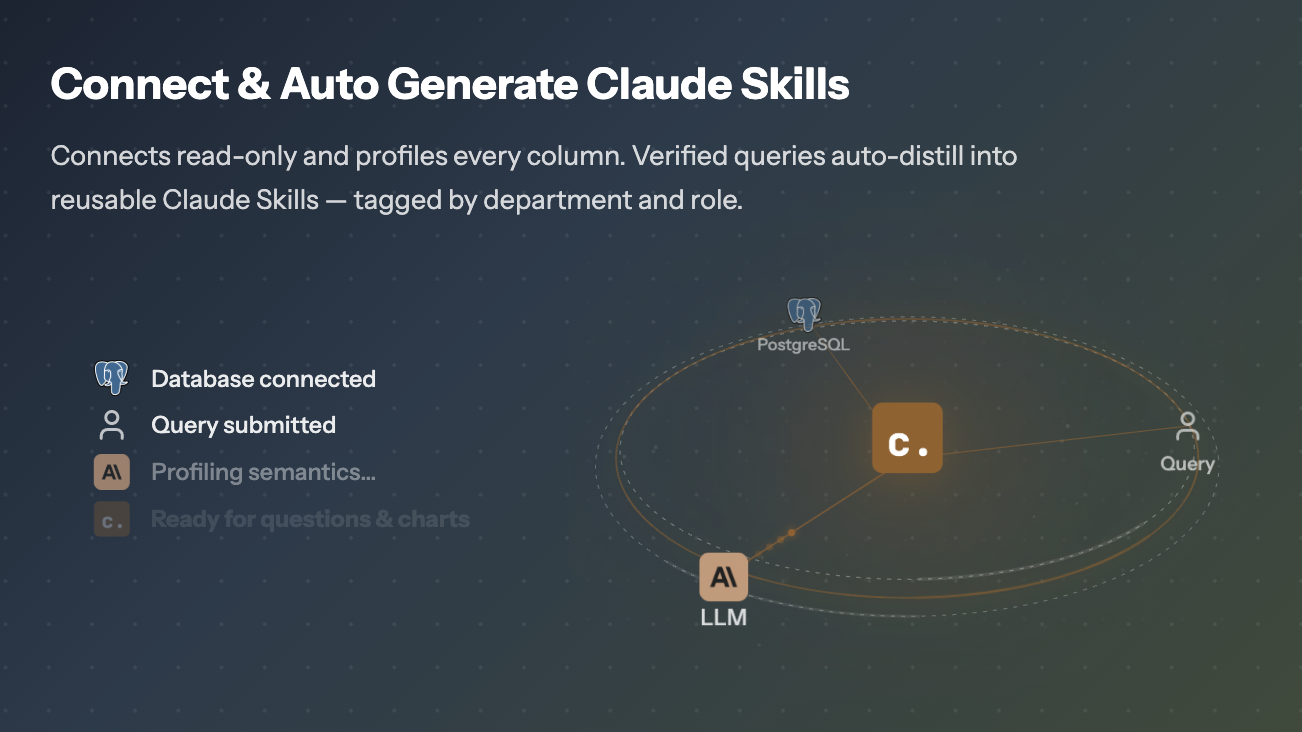
Chion connecting read-only to Postgres and auto-distilling profiled, saved and reviewed queries into reusable Claude Skills tagged by team.
One saved and reviewed SELECT, compiled into CHION.md, CONNECT.md, and one SKILL.md for the role you exported.

A Claude Code skill is one SKILL.md: frontmatter, body, and the path it loads from

A Claude Code Skill is a single Markdown file, SKILL.md, placed under .claude/skills/<role>/ in your repo, or ~/.claude/skills/<role>/ when you want it in every repo. Claude Code carries the name and description from its YAML frontmatter and loads the body on demand, when a prompt matches. The format follows the Agent Skills open standard.

Where CLAUDE.md is one root file describing the whole repo, skills are many small files describing one job each: answer revenue questions, run a security review, generate a code-validated SELECT against the Postgres warehouse. The unit shrinks; the context grows sharper.

For SQL, the killer feature is grounding. A SKILL.md body can point at a CHION.md that contains the saved and reviewed queries, schema mappings, and read-only discipline your team has already vetted, so the agent reads a reviewed join instead of guessing at a column name.

The unit shrinks; the context grows sharper.

How agent files differ: CLAUDE.md, AGENTS.md, SKILL.md, CHION.md

Before SKILL.md was a thing, Claude Code shipped with CLAUDE.md as the root agent file and OpenAI's Codex shipped with AGENTS.md. The skills convention narrows the unit of work. Instead of one big file describing the whole repo, a skill describes one job.

FileOwnerPurpose
CLAUDE.mdAnthropicRoot agent context for Claude Code. Loaded on every conversation.
AGENTS.mdOpenAIEquivalent convention used by Codex. Same role, different filename.
SKILL.mdOpen standardA scoped, role-level skill. Frontmatter declares name and description; the body loads when a prompt matches it.
CHION.mdChionAuto-generated mirror of the above, grounded in your saved and reviewed SQL queries, not your repo prose.

Pick the filename your agent reads. The saved and reviewed SELECT and its context are the same in each. What differs is how much Layer 1 rule text the file carries and where each runtime looks for it.

Two frontmatter fields do the routing: name and description

Every skill is two layers: a YAML frontmatter block the agent parses, and a Markdown body the agent reads as context once the skill is matched. The frontmatter is what makes routing work. Below is the exact shape Chion emits for a finance-analyst skill.

roles/finance-analyst/SKILL.md
---
name: finance-analyst
description: >
  Use when answering revenue, MRR, ARR, churn, cohort, or LTV questions on the
  production Postgres warehouse.
license: Proprietary
allowed-tools: Read Grep Glob Bash(python scripts/*) Bash(psql -c *)
model: claude-opus-4-7
paths: "*.sql, models/finance/**"
metadata:
  generator: chion.ai
  framework_version: "7"
  archetype: revenue-analyst
  department: finance
  analytical_pattern: trend
  tags: [postgres, finance, verified-sql]
---

Routing runs on two of these. name is the role slug. description starts with "Use when" and front-loads the high-signal vocabulary, because the format has no separate trigger-keywords field and an invented one would be ignored. The rest is bookkeeping the agent does not route on: license, a metadata map Chion stamps with the generator, framework version, archetype, department, analytical pattern, and tags, and the claude_code additions allowed-tools, model, and paths. Which blocks Chion regenerates on refresh is recorded in an audit comment at the end of the file, not in the frontmatter.

One failure mode is worth knowing: if the YAML block is malformed, the skill still loads but with empty metadata, so /skill-name keeps working while routing silently stops. Validate the frontmatter before committing. If Claude Code rejects the file outright, the fixes live in the SKILL.md frontmatter error guide.

Write a Postgres skill for Claude Code by hand in 27 lines (copy-paste)

Before you reach for a compiler, it helps to write one skill by hand. This is what a minimum viable Postgres skill for Claude Code looks like: copy, paste, edit, commit.

.claude/skills/revenue/SKILL.md
---
name: revenue
description: Use when answering MRR, ARR, recurring revenue, or revenue-by-plan questions on the Postgres warehouse.
---

# Revenue skill

## Source of truth
- table: `billing.subscriptions`
- grain: one row per subscription per active day
- metric column: `amount_cents` (additive, sum is safe)

## Saved query
```sql
SELECT date_trunc('month', billed_on) AS month,
       plan,
       SUM(amount_cents) / 100.0 AS mrr_usd
FROM   billing.subscriptions
WHERE  status = 'active'
  AND  billed_on >= now() - interval '12 months'
GROUP  BY 1, 2
ORDER  BY 1, 2
LIMIT  1000;
```

## Example prompt
"What was MRR by plan for the last 6 months?"

Two things matter for routing: the description must start with "Use when" and carry the vocabulary your team actually types, and the saved and reviewed SQL must be SELECT only, capped with LIMIT. Everything else is context the agent reads at the moment it picks the skill.

Hand-written SQL skills break the day your schema changes

Schemas drift, column names change, and hand-maintained Markdown falls behind.

The first SQL SKILL.md you write is great. The second one is fine. The tenth one is a maintenance problem. Schemas drift. Column names change. A new revenue rule lands and now three skills are quietly wrong.

The fix is not better Markdown. The fix is to treat the SKILL.md as a build artifact compiled from a source of truth your team already maintains: the queries you save and review inside the analytics tool.

Compile your saved queries into a SKILL.md, the same way on every run

The fix is to compile your team's saved and reviewed queries into one root CHION.md (shared SQL discipline, schema map, read-only rules) and a SKILL.md per role that reads back into it. The SQL-to-skill compilation flow is named, sequential, and deterministic, not a prompt that returns vibes. Source lives in supabase/functions/capability-context/compile/.

Step 1

Harvest semantic layer

Pull every query saved into this role, plus the semantic layer mappings (ai_semantic_attributes, column_profiles) those queries depend on.

Step 2

Stitch

Assemble the two-profile YAML frontmatter (portable defaults plus claude_code overrides), then the role body, the rule layer, the script index, and the per-query READMEs.

Step 3

Validate

Run the post-stitch structural validator. Description must start with 'Use when'. Role body must be 3 to 5 sentences. Required headings must exist in the documented order.

Step 4

Publish

Write one new domain_agents row, transition it from in_progress to draft to published, and supersede the prior version. Diffable like code.

Three model passes per role, roughly twenty credits per compile, one role per export today. The artifact bundle is portable. See portable SQL skills for the cross-tool runtime details.

What skills get compiled for which role

A workspace ships with named roles out of the box. Pick one to see the trigger vocabulary and the kind of skill artifact Chion's Claude SQL skills generator emits for it.

Revenue, MRR, ARR, churn, cohorts, refunds.

Triggers

revenuemrrarrchurncohortltv

Sample skill slug

monthly-recurring-revenue-by-plan

Two-profile frontmatter: portable + claude_code

SKILL.md is an open standard, but Claude Code accepts a few fields beyond the portable baseline. Chion writes both profiles. The portable profile is name, description, license, and metadata, which any host can read. The claude_code profile appends allowed-tools, model, and paths between the description and the metadata map, and a host that does not know those keys ignores them.

The practical effect: one artifact, no per-agent fork. What each agent does with it still depends on that agent.

The mutability model that lets you re-compile safely

Every block in a Chion SKILL.md has a declared mutability. This is what lets you re-run the compile on Friday afternoon without losing the rule edits you made on Monday morning.

  • Layer 1 (locked): universal SQL discipline. Inlined into every compiled SKILL.md so the file stands alone, with CHION.md carrying the same seven rules in full as an optional reference. Never overwritten by a role compile.
  • Layer 2 (overwrite-on-refresh): the role body, regenerated from the latest saved and reviewed queries on every compile.
  • Rules (pass-B): hand-authored conventions that survive refresh. This is where you put "always coalesce nulls in the revenue column".

Run one skill in Claude Code and Codex

  1. Inside Chion, export your skills. You get a folder with CHION.md and CONNECT.md at the root and one SKILL.md for the role you exported under skills/.
  2. Commit the folder. For Claude Code, the skills go under .claude/skills/ in the repo or ~/.claude/skills/ for every repo; Codex has its own documented location, so check it before assuming the folder is picked up.
  3. Open Claude Code or Codex. The root file is read at launch; a skill body is pulled in when a prompt matches its description.
  4. When the database changes, re-run the compile in Chion and push the updated artifacts. Diff the SKILL.md the same way you diff source code.

For a deeper look at running the same skill across runtimes (Chion, Claude Code, Codex), see the portable SQL skills explainer. Chion compiles and hosts these as portable SQL skills; the analyst-facing surface is Chion's AI SQL Analyst framework.

Write the same contract for image and web skills: only the evidence changes

Nothing in the SKILL.md contract is specific to SQL. Frontmatter routes on a name and a description, and the body tells the agent what it is allowed to treat as true. Swap the evidence store and the same file governs a skill that reads pictures, or one that reads the open web.

An image-recognition skill

A vision model proposes a label, and a label is a guess until something independent agrees with it. The skill body names the confirming source and the agreement bar, so the agent can return "not confirmed" instead of a confident wrong noun.

A web-research skill

Fetching the page is the easy half. The contract is which claims may leave it: only the ones present in a document the skill actually retrieved, each carrying the link it came from. Model memory is not a source.

That shape already runs outside analytics. Lensmark, an AI landmark identifier built on the same rule, takes a photograph of a building, a monument, or a museum piece and returns its history: what it is, when it went up, who made it, and why it mattered. Independent identifiers have to agree before a name reaches the reader, every date traces to a retrieved source the reader can open, and a subject nothing can confirm comes back as unconfirmed rather than as a plausible guess.

Only the evidence store differs. Chion's is a read-only SELECT your team saved, reviewed, and already trusts; a photo skill's is the public record. The frontmatter, the routing, and the rule against answering past your evidence are the same three moves.

Pitfalls and how to avoid them

Description without "Use when"

Routing falls back to fuzzy matching across the body. Always lead with "Use when..." so Claude's router has a clean signal.

Overlapping descriptions across skills

Two descriptions both leading on revenue race for the same prompt. Scope each description to one role; let CHION.md hold the shared vocabulary.

A skill with no row cap exfiltrates your table on first run

A skill without a row cap exfiltrates the table the first time it runs. Cap every query in the SKILL.md, not just at the runtime layer.

Hand edits in the wrong block

Edits inside overwrite-on-refresh blocks vanish on the next compile. Put durable rules in the pass-B rules section so they survive.

Forgetting to commit CHION.md

A compiled SKILL.md inlines the seven Layer 1 rules, so a missing CHION.md costs you the full text and rationale, nothing more. Hand-written skills carry only a pointer, and that one breaks without the file.

Treating skills as one-off prose

A skill is a build artifact. Source-of-truth lives in the saved and reviewed query, not the Markdown. Re-compile when the schema changes; never patch the Markdown by hand.

Quick reference

  • Claude Code Skills are role-scoped SKILL.md files under .claude/skills/ in the repo or ~/.claude/skills/ for every repo. Claude Code carries the name and description and loads the body on demand.
  • Routing runs on two frontmatter fields, name and description. There is no triggers field, so the trigger vocabulary is front-loaded into the description.
  • Chion auto-compiles SQL SKILL.md files from your saved and reviewed queries via a four step pipeline: harvest, stitch, validate, publish.
  • Two-profile frontmatter (portable name/description/license/metadata, plus claude_code allowed-tools/model/paths) keeps one artifact readable in Claude Code and Codex.
  • The mutability model separates locked discipline, refreshable role content, and durable hand-authored rules. It is recorded in the file's audit comment, not the frontmatter.
  • The bundle shares one thing across filenames: the saved and reviewed SELECT and the context around it. CHION.md holds the seven Layer 1 rules in full while a compiled SKILL.md inlines a summary of each, so pick the filename your agent reads and check that agent's own discovery path.

Frequently asked

Why isn't my Claude Code skill triggering?

Malformed frontmatter YAML makes Claude Code load the body with empty metadata, so /skill-name still works but routing has no description to match. Run with --debug to see the parse error. Also check the description starts with "Use when" and front-loads the vocabulary users actually type, because the description is the only routing text the agent indexes.

What are Claude Code Skills?

Claude Code Skills are role-scoped Markdown files (SKILL.md) with YAML frontmatter. Each skill declares a name and a description. Claude Code keeps that name and description in context and loads the skill body on demand, when a prompt matches the description, so an unused skill costs almost nothing.

How do Claude Code Skills work?

Claude Code reads CLAUDE.md at the repo root and discovers SKILL.md files under .claude/skills/ in the project and ~/.claude/skills/ in your home directory. It carries only each skill's name and description, then loads the matched skill's body into the working context when a prompt matches. Loading is on demand, so twenty skills do not cost twenty skill bodies of context.

What is the SKILL.md format?

SKILL.md is a Markdown file with a YAML frontmatter block at the top. Two fields carry the routing: name (the role slug) and description (starts with "Use when..." and front-loads the trigger vocabulary, because there is no separate triggers field). Chion also writes license and a metadata map, and its claude_code profile adds allowed-tools, model, and paths. The body below the frontmatter is the role context the agent reads once the skill is matched.

Where does Claude Code look for SKILL.md files?

Two places: .claude/skills/ in the project, and ~/.claude/skills/ in your home directory for skills you want in every repo. One folder per role, like .claude/skills/finance-analyst/, each holding a SKILL.md. Claude Code reads the root agent file for global context and carries each skill's name and description, then pulls the body in when a prompt matches. Chion writes its compiled skills into that same .claude/skills/ tree, so they load with no extra wiring.

Can I hand-write Claude Code Skills for SQL?

You can, and the open standard supports it. The trouble is that SQL skills go stale the moment your schema changes. Chion auto-compiles the SKILL.md files for you from the saved and reviewed queries your team already runs, so the skill artifact stays grounded in the actual database, not in a snapshot of your repo prose.

What does Chion compile, exactly?

For each role in your workspace, Chion runs three model passes that stitch a SKILL.md with two-profile frontmatter (portable and claude_code), a role body, the rule layer, the saved and reviewed query index, and a per-script README. The slot-filling pass runs at temperature 0, so the same evidence produces the same SKILL.md structure and the same scripts folder; role voice and rule selection allow mild variation.

Where does the trigger vocabulary come from?

From the role vocabulary plus the queries your team saved into that role. A finance-analyst skill that contains an MRR query gets mrr front-loaded into its description, because a separate triggers field is not part of the format and would be dropped. You can also edit the description by hand. Both paths converge on the same SKILL.md.

Does this work with Codex too?

Chion compiles CHION.md, CONNECT.md, and a SKILL.md per role; CLAUDE.md and AGENTS.md stay the files you maintain for your runtime. Claude Code reads CLAUDE.md, Codex reads AGENTS.md, and each runtime discovers skills by its own documented convention, so check that convention before assuming a folder is picked up. What travels unchanged is the saved and reviewed SELECT and the context around it, not the runtime behaviour.

How do I make a Postgres skill for Claude by hand?

Create .claude/skills/<role>/SKILL.md with YAML frontmatter: a name and a description that starts with "Use when" and carries the words your team actually types. In the body, document the table, the saved and reviewed SELECT statement, expected row shape, and a worked example prompt. Point the body at a CHION.md in the repo for shared SQL discipline (read-only, LIMIT, no PII columns) so every skill quotes the same guardrails.

What is the mutability model?

Layer 1 is the locked discipline, inlined into every compiled SKILL.md so the file stands alone, with CHION.md carrying the same seven rules in full as an optional reference. Layer 2 is the role body, which Chion overwrites on every refresh. Hand edits go into a dedicated rules block the next compile preserves. This is what makes the compile safe to re-run.

Generate a SQL skill from your own saved queries

Connect a read-only Postgres role, save a few reviewed queries in Studio, and export the role skills folder. Read-only SELECT. Credentials in an AES-256-GCM vault. Results capped at 1,000 rows. Each executed query leaves an audit row, written fire-and-forget so a logging failure never blocks your answer.

    Blog/Claude Code Skills

    Build a Claude Code SQL skill that loads saved query instructions on demand

    A Claude Code SQL skill is a SKILL.md file under .claude/skills/ whose YAML frontmatter carries a name and description, and whose body holds a read-only SELECT a teammate saved and reviewed in Studio, so Claude Code runs your team's query instead of writing a new one from the schema. Hand-written ones go wrong the day a column is renamed, so compile the body from queries your team already saved and reviewed, then re-compile when the schema moves.

    By Jonathan Dag, Founder & CEO··Updated September 2, 2026
    Chion connecting read-only to Postgres and auto-distilling profiled, saved and reviewed queries into reusable Claude Skills tagged by team.
    One saved and reviewed SELECT, compiled into CHION.md, CONNECT.md, and one SKILL.md for the role you exported.

    A Claude Code skill is one SKILL.md: frontmatter, body, and the path it loads from

    A Claude Code Skill is a single Markdown file, SKILL.md, placed under .claude/skills/<role>/ in your repo, or ~/.claude/skills/<role>/ when you want it in every repo. Claude Code carries the name and description from its YAML frontmatter and loads the body on demand, when a prompt matches. The format follows the Agent Skills open standard.

    Where CLAUDE.md is one root file describing the whole repo, skills are many small files describing one job each: answer revenue questions, run a security review, generate a code-validated SELECT against the Postgres warehouse. The unit shrinks; the context grows sharper.

    For SQL, the killer feature is grounding. A SKILL.md body can point at a CHION.md that contains the saved and reviewed queries, schema mappings, and read-only discipline your team has already vetted, so the agent reads a reviewed join instead of guessing at a column name.

    The unit shrinks; the context grows sharper.

    How agent files differ: CLAUDE.md, AGENTS.md, SKILL.md, CHION.md

    Before SKILL.md was a thing, Claude Code shipped with CLAUDE.md as the root agent file and OpenAI's Codex shipped with AGENTS.md. The skills convention narrows the unit of work. Instead of one big file describing the whole repo, a skill describes one job.

    FileOwnerPurpose
    CLAUDE.mdAnthropicRoot agent context for Claude Code. Loaded on every conversation.
    AGENTS.mdOpenAIEquivalent convention used by Codex. Same role, different filename.
    SKILL.mdOpen standardA scoped, role-level skill. Frontmatter declares name and description; the body loads when a prompt matches it.
    CHION.mdChionAuto-generated mirror of the above, grounded in your saved and reviewed SQL queries, not your repo prose.

    Pick the filename your agent reads. The saved and reviewed SELECT and its context are the same in each. What differs is how much Layer 1 rule text the file carries and where each runtime looks for it.

    Two frontmatter fields do the routing: name and description

    Every skill is two layers: a YAML frontmatter block the agent parses, and a Markdown body the agent reads as context once the skill is matched. The frontmatter is what makes routing work. Below is the exact shape Chion emits for a finance-analyst skill.

    roles/finance-analyst/SKILL.md
    ---
    name: finance-analyst
    description: >
      Use when answering revenue, MRR, ARR, churn, cohort, or LTV questions on the
      production Postgres warehouse.
    license: Proprietary
    allowed-tools: Read Grep Glob Bash(python scripts/*) Bash(psql -c *)
    model: claude-opus-4-7
    paths: "*.sql, models/finance/**"
    metadata:
      generator: chion.ai
      framework_version: "7"
      archetype: revenue-analyst
      department: finance
      analytical_pattern: trend
      tags: [postgres, finance, verified-sql]
    ---

    Routing runs on two of these. name is the role slug. description starts with "Use when" and front-loads the high-signal vocabulary, because the format has no separate trigger-keywords field and an invented one would be ignored. The rest is bookkeeping the agent does not route on: license, a metadata map Chion stamps with the generator, framework version, archetype, department, analytical pattern, and tags, and the claude_code additions allowed-tools, model, and paths. Which blocks Chion regenerates on refresh is recorded in an audit comment at the end of the file, not in the frontmatter.

    One failure mode is worth knowing: if the YAML block is malformed, the skill still loads but with empty metadata, so /skill-name keeps working while routing silently stops. Validate the frontmatter before committing. If Claude Code rejects the file outright, the fixes live in the SKILL.md frontmatter error guide.

    Write a Postgres skill for Claude Code by hand in 27 lines (copy-paste)

    Before you reach for a compiler, it helps to write one skill by hand. This is what a minimum viable Postgres skill for Claude Code looks like: copy, paste, edit, commit.

    .claude/skills/revenue/SKILL.md
    ---
    name: revenue
    description: Use when answering MRR, ARR, recurring revenue, or revenue-by-plan questions on the Postgres warehouse.
    ---
    
    # Revenue skill
    
    ## Source of truth
    - table: `billing.subscriptions`
    - grain: one row per subscription per active day
    - metric column: `amount_cents` (additive, sum is safe)
    
    ## Saved query
    ```sql
    SELECT date_trunc('month', billed_on) AS month,
           plan,
           SUM(amount_cents) / 100.0 AS mrr_usd
    FROM   billing.subscriptions
    WHERE  status = 'active'
      AND  billed_on >= now() - interval '12 months'
    GROUP  BY 1, 2
    ORDER  BY 1, 2
    LIMIT  1000;
    ```
    
    ## Example prompt
    "What was MRR by plan for the last 6 months?"

    Two things matter for routing: the description must start with "Use when" and carry the vocabulary your team actually types, and the saved and reviewed SQL must be SELECT only, capped with LIMIT. Everything else is context the agent reads at the moment it picks the skill.

    Hand-written SQL skills break the day your schema changes

    Schemas drift, column names change, and hand-maintained Markdown falls behind.

    The first SQL SKILL.md you write is great. The second one is fine. The tenth one is a maintenance problem. Schemas drift. Column names change. A new revenue rule lands and now three skills are quietly wrong.

    The fix is not better Markdown. The fix is to treat the SKILL.md as a build artifact compiled from a source of truth your team already maintains: the queries you save and review inside the analytics tool.

    Compile your saved queries into a SKILL.md, the same way on every run

    The fix is to compile your team's saved and reviewed queries into one root CHION.md (shared SQL discipline, schema map, read-only rules) and a SKILL.md per role that reads back into it. The SQL-to-skill compilation flow is named, sequential, and deterministic, not a prompt that returns vibes. Source lives in supabase/functions/capability-context/compile/.

    Step 1

    Harvest semantic layer

    Pull every query saved into this role, plus the semantic layer mappings (ai_semantic_attributes, column_profiles) those queries depend on.

    Step 2

    Stitch

    Assemble the two-profile YAML frontmatter (portable defaults plus claude_code overrides), then the role body, the rule layer, the script index, and the per-query READMEs.

    Step 3

    Validate

    Run the post-stitch structural validator. Description must start with 'Use when'. Role body must be 3 to 5 sentences. Required headings must exist in the documented order.

    Step 4

    Publish

    Write one new domain_agents row, transition it from in_progress to draft to published, and supersede the prior version. Diffable like code.

    Three model passes per role, roughly twenty credits per compile, one role per export today. The artifact bundle is portable. See portable SQL skills for the cross-tool runtime details.

    What skills get compiled for which role

    A workspace ships with named roles out of the box. Pick one to see the trigger vocabulary and the kind of skill artifact Chion's Claude SQL skills generator emits for it.

    Revenue, MRR, ARR, churn, cohorts, refunds.

    Triggers

    revenuemrrarrchurncohortltv

    Sample skill slug

    monthly-recurring-revenue-by-plan

    Two-profile frontmatter: portable + claude_code

    SKILL.md is an open standard, but Claude Code accepts a few fields beyond the portable baseline. Chion writes both profiles. The portable profile is name, description, license, and metadata, which any host can read. The claude_code profile appends allowed-tools, model, and paths between the description and the metadata map, and a host that does not know those keys ignores them.

    The practical effect: one artifact, no per-agent fork. What each agent does with it still depends on that agent.

    The mutability model that lets you re-compile safely

    Every block in a Chion SKILL.md has a declared mutability. This is what lets you re-run the compile on Friday afternoon without losing the rule edits you made on Monday morning.

    • Layer 1 (locked): universal SQL discipline. Inlined into every compiled SKILL.md so the file stands alone, with CHION.md carrying the same seven rules in full as an optional reference. Never overwritten by a role compile.
    • Layer 2 (overwrite-on-refresh): the role body, regenerated from the latest saved and reviewed queries on every compile.
    • Rules (pass-B): hand-authored conventions that survive refresh. This is where you put "always coalesce nulls in the revenue column".

    Run one skill in Claude Code and Codex

    1. Inside Chion, export your skills. You get a folder with CHION.md and CONNECT.md at the root and one SKILL.md for the role you exported under skills/.
    2. Commit the folder. For Claude Code, the skills go under .claude/skills/ in the repo or ~/.claude/skills/ for every repo; Codex has its own documented location, so check it before assuming the folder is picked up.
    3. Open Claude Code or Codex. The root file is read at launch; a skill body is pulled in when a prompt matches its description.
    4. When the database changes, re-run the compile in Chion and push the updated artifacts. Diff the SKILL.md the same way you diff source code.

    For a deeper look at running the same skill across runtimes (Chion, Claude Code, Codex), see the portable SQL skills explainer. Chion compiles and hosts these as portable SQL skills; the analyst-facing surface is Chion's AI SQL Analyst framework.

    Write the same contract for image and web skills: only the evidence changes

    Nothing in the SKILL.md contract is specific to SQL. Frontmatter routes on a name and a description, and the body tells the agent what it is allowed to treat as true. Swap the evidence store and the same file governs a skill that reads pictures, or one that reads the open web.

    An image-recognition skill

    A vision model proposes a label, and a label is a guess until something independent agrees with it. The skill body names the confirming source and the agreement bar, so the agent can return "not confirmed" instead of a confident wrong noun.

    A web-research skill

    Fetching the page is the easy half. The contract is which claims may leave it: only the ones present in a document the skill actually retrieved, each carrying the link it came from. Model memory is not a source.

    That shape already runs outside analytics. Lensmark, an AI landmark identifier built on the same rule, takes a photograph of a building, a monument, or a museum piece and returns its history: what it is, when it went up, who made it, and why it mattered. Independent identifiers have to agree before a name reaches the reader, every date traces to a retrieved source the reader can open, and a subject nothing can confirm comes back as unconfirmed rather than as a plausible guess.

    Only the evidence store differs. Chion's is a read-only SELECT your team saved, reviewed, and already trusts; a photo skill's is the public record. The frontmatter, the routing, and the rule against answering past your evidence are the same three moves.

    Pitfalls and how to avoid them

    Description without "Use when"

    Routing falls back to fuzzy matching across the body. Always lead with "Use when..." so Claude's router has a clean signal.

    Overlapping descriptions across skills

    Two descriptions both leading on revenue race for the same prompt. Scope each description to one role; let CHION.md hold the shared vocabulary.

    A skill with no row cap exfiltrates your table on first run

    A skill without a row cap exfiltrates the table the first time it runs. Cap every query in the SKILL.md, not just at the runtime layer.

    Hand edits in the wrong block

    Edits inside overwrite-on-refresh blocks vanish on the next compile. Put durable rules in the pass-B rules section so they survive.

    Forgetting to commit CHION.md

    A compiled SKILL.md inlines the seven Layer 1 rules, so a missing CHION.md costs you the full text and rationale, nothing more. Hand-written skills carry only a pointer, and that one breaks without the file.

    Treating skills as one-off prose

    A skill is a build artifact. Source-of-truth lives in the saved and reviewed query, not the Markdown. Re-compile when the schema changes; never patch the Markdown by hand.

    Quick reference

    • Claude Code Skills are role-scoped SKILL.md files under .claude/skills/ in the repo or ~/.claude/skills/ for every repo. Claude Code carries the name and description and loads the body on demand.
    • Routing runs on two frontmatter fields, name and description. There is no triggers field, so the trigger vocabulary is front-loaded into the description.
    • Chion auto-compiles SQL SKILL.md files from your saved and reviewed queries via a four step pipeline: harvest, stitch, validate, publish.
    • Two-profile frontmatter (portable name/description/license/metadata, plus claude_code allowed-tools/model/paths) keeps one artifact readable in Claude Code and Codex.
    • The mutability model separates locked discipline, refreshable role content, and durable hand-authored rules. It is recorded in the file's audit comment, not the frontmatter.
    • The bundle shares one thing across filenames: the saved and reviewed SELECT and the context around it. CHION.md holds the seven Layer 1 rules in full while a compiled SKILL.md inlines a summary of each, so pick the filename your agent reads and check that agent's own discovery path.

    Frequently asked

    Why isn't my Claude Code skill triggering?

    Malformed frontmatter YAML makes Claude Code load the body with empty metadata, so /skill-name still works but routing has no description to match. Run with --debug to see the parse error. Also check the description starts with "Use when" and front-loads the vocabulary users actually type, because the description is the only routing text the agent indexes.

    What are Claude Code Skills?

    Claude Code Skills are role-scoped Markdown files (SKILL.md) with YAML frontmatter. Each skill declares a name and a description. Claude Code keeps that name and description in context and loads the skill body on demand, when a prompt matches the description, so an unused skill costs almost nothing.

    How do Claude Code Skills work?

    Claude Code reads CLAUDE.md at the repo root and discovers SKILL.md files under .claude/skills/ in the project and ~/.claude/skills/ in your home directory. It carries only each skill's name and description, then loads the matched skill's body into the working context when a prompt matches. Loading is on demand, so twenty skills do not cost twenty skill bodies of context.

    What is the SKILL.md format?

    SKILL.md is a Markdown file with a YAML frontmatter block at the top. Two fields carry the routing: name (the role slug) and description (starts with "Use when..." and front-loads the trigger vocabulary, because there is no separate triggers field). Chion also writes license and a metadata map, and its claude_code profile adds allowed-tools, model, and paths. The body below the frontmatter is the role context the agent reads once the skill is matched.

    Where does Claude Code look for SKILL.md files?

    Two places: .claude/skills/ in the project, and ~/.claude/skills/ in your home directory for skills you want in every repo. One folder per role, like .claude/skills/finance-analyst/, each holding a SKILL.md. Claude Code reads the root agent file for global context and carries each skill's name and description, then pulls the body in when a prompt matches. Chion writes its compiled skills into that same .claude/skills/ tree, so they load with no extra wiring.

    Can I hand-write Claude Code Skills for SQL?

    You can, and the open standard supports it. The trouble is that SQL skills go stale the moment your schema changes. Chion auto-compiles the SKILL.md files for you from the saved and reviewed queries your team already runs, so the skill artifact stays grounded in the actual database, not in a snapshot of your repo prose.

    What does Chion compile, exactly?

    For each role in your workspace, Chion runs three model passes that stitch a SKILL.md with two-profile frontmatter (portable and claude_code), a role body, the rule layer, the saved and reviewed query index, and a per-script README. The slot-filling pass runs at temperature 0, so the same evidence produces the same SKILL.md structure and the same scripts folder; role voice and rule selection allow mild variation.

    Where does the trigger vocabulary come from?

    From the role vocabulary plus the queries your team saved into that role. A finance-analyst skill that contains an MRR query gets mrr front-loaded into its description, because a separate triggers field is not part of the format and would be dropped. You can also edit the description by hand. Both paths converge on the same SKILL.md.

    Does this work with Codex too?

    Chion compiles CHION.md, CONNECT.md, and a SKILL.md per role; CLAUDE.md and AGENTS.md stay the files you maintain for your runtime. Claude Code reads CLAUDE.md, Codex reads AGENTS.md, and each runtime discovers skills by its own documented convention, so check that convention before assuming a folder is picked up. What travels unchanged is the saved and reviewed SELECT and the context around it, not the runtime behaviour.

    How do I make a Postgres skill for Claude by hand?

    Create .claude/skills/<role>/SKILL.md with YAML frontmatter: a name and a description that starts with "Use when" and carries the words your team actually types. In the body, document the table, the saved and reviewed SELECT statement, expected row shape, and a worked example prompt. Point the body at a CHION.md in the repo for shared SQL discipline (read-only, LIMIT, no PII columns) so every skill quotes the same guardrails.

    What is the mutability model?

    Layer 1 is the locked discipline, inlined into every compiled SKILL.md so the file stands alone, with CHION.md carrying the same seven rules in full as an optional reference. Layer 2 is the role body, which Chion overwrites on every refresh. Hand edits go into a dedicated rules block the next compile preserves. This is what makes the compile safe to re-run.

    Generate a SQL skill from your own saved queries

    Connect a read-only Postgres role, save a few reviewed queries in Studio, and export the role skills folder. Read-only SELECT. Credentials in an AES-256-GCM vault. Results capped at 1,000 rows. Each executed query leaves an audit row, written fire-and-forget so a logging failure never blocks your answer.